



Tell me you’re migrating from Magento to Shopify without telling me you’re migrating from Magento to Shopify. I’ll go first.
You’re staring at a 50GB folder of unoptimized images.
You’ve developed a Pavlovian response every time you see a “Security Patch” notification.
Your “Local Code Pool” has started to feel less like a feature and more like a house of cards.
And, perhaps most tellingly, you’re right now fixated on one question—if the order of stuff, of your data, of your URLs, and of your customer logic, will survive the Magento to Shopify migration.
That’s right. Having been hands-on with Shopify and involved in both consultancy and solution roles across countless replatforming projects, we know how misguided it is to think a Magento to Shopify migration is just data movement.
You don’t copy and paste your Magento store data into Shopify. That can’t be migration.
In reality, Magento to Shopify migration needs an architectural rewrite. Outdated or modern, e-commerce store built on Magento has a different architecture than that of Shopify.
While most automated migration tools do a great job at the data transfer portion of the migration, it’s a disaster when you rely on them completely. They miss custom code, relational data structures, and specific business logic that only your team understands.
You didn’t survive Magento’s ops hell to settle for tag-flattened sales logic. So let’s do the migration properly. You know only Shopify now.
In this post, we’re discussing complex challenges and their solutions when you migrate from Magento to Shopify.
Besides, we have another detailed guide on Shopify migration checklist for you.
The Biggest Magento to Shopify migration challenges and how experts solve them
Challenge # 1 Recreating Magento’s EAV data model and relational logic
Magento’s database architecture follows the Entity-Attribute-Value (EAV) model. In such a database, Magento doesn’t store all product information in a rigid table. It separates:
- Entity → the object (product, category, customer, order)
- Attribute → the property (fabric composition, designer, SKU, sustainability rating)
- Value → the actual data linked to that attribute.
In simpler terms, EAV is an invisible web where every product detail is stored in its own separate “folder” and linked back to the product. It’s for Magento developers to simplify adding infinite attributes to a product without altering the core database schema.
Over time, you can handle incredibly complex product relationships and create richly structured catalogs with dozens, or hundreds of attributes powering filtering, merchandising, and compatibility logic.
The problem occurs during Magento to Shopify data migration.
Shopify operates on a much more structured, relational model. Most standard migration tools “flatten” the complex Magento data model into Shopify Tags. “flat.” Instead of keeping those details in organized folders, they dump everything into a single bucket called Tags.
A Magento product with attributes for “Fabric Composition,” “Manufacturer SKU,” and “Sustainability Rating,” might get converted into three unrelated tags. And you lose the relational intelligence of your data.
- Complex filtering, “Shop by Designer” logic, and part-compatibility matrices become a mess of unorganized strings.
- Your frontend filters become inaccurate and slow.
- Your backend becomes a “Tag Soup” forcing your team to manually manage disconnected tags rather than giving them a clean dropdown menu.
- Furthermore, Magento’s tiered pricing and bundled products doesn’t have an equivalent in a standard Shopify setup.
So, if you fail to rebuild these structures, important business logic disappears during the Magento to Shopify data migration.
Solution: Build a structured Shopify data schema with Metaobjects
For a successful Magento to Shopify data migration, we move away from exporting product records and rebuild the catalog architecture inside Shopify. Shopify’s structured data tools, metafields and metaobjects are your allies here.
Basically, to prevent flattening Magento attributes into tags, we need to design a schema that retains the original relationships:
1. Use Metaobjects for relational data
Some attributes are independent entities and need their own identity. Such as Brands, Designers, or Compatibility Groups. For such attributes, create metaobjects.
Metaobjects in Shopify are the custom data models that you use to add and update structured information to your store.
For example, a “Brand” metaobject could contain:
- brand name
- logo
- description
- warranty policy
When you update the “Designer” Metaobject once, every product linked to that designer updates automatically. This recreates the relational behavior Magento’s EAV model provided, while maintaining a single source of truth inside Shopify.
2. Categorize attributes intentionally
During Magento to Shopify data migration, audit Magento attributes and assign them to the right structure in Shopify based on functionality. This is called data mapping.
For instance, What is “Customer ID” in Magento is “Client Number” in Shopify. Don’t map these relationships and be prepared for your data landing in wrong fields or disappearing.
Typical data mapping looks like this:
- Variants → Use these for attributes that affect purchasing and require unique SKUs. For example, size, color, capacity, etc.
- Metafields → Use these for informational attributes such as material, voltage, sustainability rating, or technical specifications.
- Deprecated attributes → removed to keep the catalog lean.
This step will help you prevent your Shopify store from becoming stuffed with unnecessary product options or tags.
3. Restructure complex configurable products
Magento configurable products can contain large attribute combinations. And it handles it fine. Customers pick options, backend assembles SKU on the fly.
Shopify enforces strict variant limits per product. Up to 2,048 variants for a product. So, importing them directly and Shopify hard-chops at the limit. Missing sizes, colors, or widths.
Experienced teams restructure these products. Often splitting it into separate products and using Metaobjects to link them together on the frontend, ensuring the user experience remains seamless while staying within Shopify’s architectural guardrails.
4. Preserve tiered pricing and bundles
To maintain the tiered pricing and bundled product logic functionality during the migration from Magento to Shopify:
- Shopify Plus merchants can map tiered pricing to Price Lists or B2B pricing structures.
- Metafields can store pricing rules or bundle relationships that trigger logic via Shopify APIs or storefront scripts.
Dig deeper: Why Shopify doesn’t use Parent-Child categories (And what to do instead)
Challenge # 2: SEO continuity and the Magento “.html” URL legacy
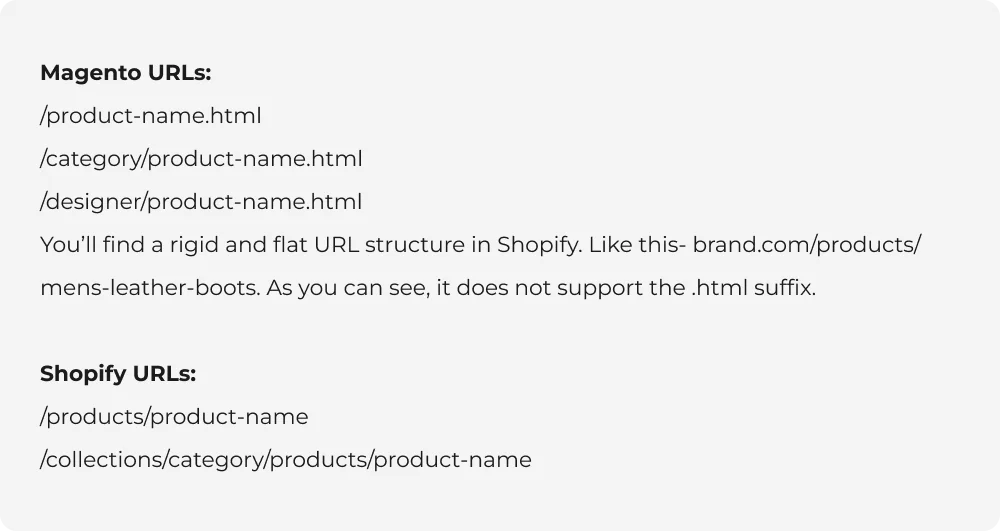
Magento’s URL structure is different from Shopify’s–
- Magento appends a .html suffix to every product and category page. E.g., brand.com/mens-leather-boots.html.
- Magento allows for deeply nested URLs like brand.com/shop/footwear/boots/mens-leather-boots.html.
Why is this a challenge for brands preparing for Magento to Shopify product migration? Here are the reasons:
- When you switch your DNS (pointing your domain from Magento to Shopify), there is a “propagation window” where global servers are updating. Google and users may still request the old Magento URLs. Every single .html link Google knows becomes a mismatch. Without redirects, 100% of external traffic hits 404s.
Magento: brand.com/mens-leather-boots.html ✅ Google indexed
Shopify: brand.com/products/mens-leather-boots ✅ Native format
If Google’s crawlers hit your site during this time and see thousands of .html links returning “404 Not Found” errors, Google assumes your store is broken and may:
- drop pages from the index.
- lose page authority signals.
- reduce organic traffic.
- You’ve spent years building “SEO Equity” on those specific .html links. If you don’t map them perfectly to the new Shopify links, that authority vanishes.
- Every marketing email you’ve ever sent, every social media post, and every customer bookmark will lead to an “Error 404” page.
Solution: Regex-based redirect mapping and URL prefix stripping
To prevent a total collapse in organic traffic, we can’t just hope and pray Google finds the new pages. We use a technical “mapping” strategy that works globally across your entire catalog.
1. Regex-based redirects
Instead of adding a source and a destination URL for normal redirects (which is prone to human error), we use Regex (Regular Expressions). Regex is a piece of code logic. It tells the server: “Look for any URL ending in .html, strip that suffix off, and point the user to the same page name on Shopify.” This handles 10,000+ products instantly and accurately.
2. URL prefix stripping
Magento often includes the entire category path in the URL (e.g., /shop/outdoor/footwear/boots/). Shopify only wants /products/boots. Use “Prefix Stripping” to automatically identify those middle category layers and remove them during the redirect process. This ensures users arrive on the intended page.
3. Pre-launch “Traffic Control”
Before the site goes live, upload these “Redirect Maps” into Shopify’s URL redirect engine. This means that the very second your DNS points to Shopify, the redirects are already “live.”
In addition to this, ensure that your SSL certificates and redirects are provisioned before the final switch. This means that even during the 48-hour propagation window, any “stray” traffic hitting the old Magento-style links is immediately caught and redirected to the new Shopify page.
Challenge # 3: Legacy asset bloat and theme performance
It’s not unusual in Magento to find asset libraries exceeding 50GB with high-resolution JPEGs, and unoptimized PNGs. Not to forget the multiple duplicate versions of the same product photo created by Magento’s various thumbnail generators.
If you give in to the temptation to move those legacy assets into Shopify as is, you are sabotaging your new site before it even launches. Sure, Shopify’s infrastructure is powerful. But dragging unoptimized bloat into a modern, high-speed theme like “Dawn” will eventually cripple your store performance.
Solution: The “Clean-before-Load” asset strategy
Ensure your new Shopify store is lightning-fast by following the “Clean-before-Load” rule. Use external scripts to process the assets before they ever touch the Shopify Files API.
Here is the technical workflow to protect your site speed:
- Use a script to analyze the “fingerprint” (hash) of every image file. Identify these duplicates and retain only one master version. You’ll see drastic reduction in your storage footprint.
- Before uploading, programmatically convert your entire library to WebP. It’s a great modern image format that provides superior compression.
- Skip the manual upload. Use the Shopify Files API to map these cleaned, optimized images directly to your product catalog.
- While cleaning the images, we ensure that SEO “Alt Text” and descriptive filenames are preserved and mapped correctly. So, you don’t lose the image-search ranking power you’ve built over the years.
Dig deeper: Advanced Shopify performance optimizations: How to improve speed, core web vitals, and UX?
Challenge # 4: The multi-store management
In Magento, managing international growth is traditionally handled through “Store Views.” While this allows for localized languages and currencies, it creates a complex backend web that is difficult to maintain.
Historically, migrating these views to Shopify was an operational nightmare. To replicate five Magento Store Views, merchants were often forced to open five separate “Expansion Stores.”
Why this is an operational burden:
- Fragmented inventory: You end up with five different inventory pools. If you sell a shirt in the UK, your US store doesn’t know about it, leading to overselling or manual syncing headaches.
- Multiplied costs: Five stores mean five sets of app subscriptions and five different themes to update every time you want to make a small design change.
- Data silos: Your customer data and sales reports are split across five different dashboards, making it nearly impossible to get a “Single Source of Truth” for your global business.
Solution: Global consolidation with Shopify Markets
We have moved past the era of “one store per country.” For mid-to-large brands, the modern solution is to consolidate those messy Magento views into a single Shopify admin using Shopify Markets (and Markets Pro for advanced compliance).
Instead of managing five separate entities, we architect a unified global store:
1. Single admin, global reach
Bring all your regions under one roof. You manage one product catalog, one set of apps, and one theme. When you change a price or update a photo, it happens everywhere instantly.
2. Localized subfolders for SEO
To maintain your search rankings in different countries, use localized subfolders. This keeps your “Domain Authority” concentrated in one place rather than splitting it across multiple domains.
3. Intelligent localization
Shopify Markets allows you to customize the experience for each region within that single admin. You can set unique pricing (including duty and tax calculations), show specific products only in certain regions, and offer local payment methods like iDEAL or Bancontact, all without leaving your main dashboard.
3. Unified inventory and fulfillment
By consolidating stores, your inventory becomes a single, smart pool. Shopify automatically routes orders to the correct warehouse based on the customer’s location, drastically reducing shipping times and costs.
Challenge # 5: Customer password incompatibility
You can’t copy over passwords during a Magento to Shopify migration. Magento encrypts user passwords with MD5 or SHA-256 algorithms. Shopify? Its own BCrypt-based authentication system with a different hashing structure.
Because Shopify’s system is a “black box” for security reasons, you cannot simply “copy and paste” these encrypted strings into the new database. Even as an admin, you can’t see the plain-text passwords to move them.
What happens if you don’t handle password migration in Shopify correctly?
- Your loyal customers will try to log in on launch day and face repeated “Invalid Password” errors.
- This leads to high customer support volume, abandoned carts, and a general feeling that the new site is “broken.”
To tackle this, most brands resort to a generic “Password Reset” email, which customers tend to ignore or mistake for a phishing attempt.
Dig deeper:
- How to stop losing orders to delivery surprises on Shopify checkout
- How to enable Shopify recurring billing in 2026: A step-by-step no-code walkthrough
Solution: Secure account migration via multipass or branded activation
To solve this, replace “migration” with “re-authentication.”
As we detailed in our guide on Secure Data Migration: How To Migrate Orders, Customers & Passwords In Shopify, there are two professional ways depending on your Shopify plan:
For Shopify Plus, use Multipass.
Multipass is Shopify’s Single Sign-On (SSO) solution.
How it works: When a customer tries to log in to Shopify, your system checks the old Magento credentials in the background. If they match, it generates a “Multipass Token” that logs them in instantly and creates their new Shopify credentials on the fly.
The Result: The customer never even knows a migration happened. It is the gold standard for user experience.
For standard Shopify plans, use the “Security Upgrade” activation strategy
For merchants on standard Shopify plans, the more practical option is an account activation workflow. However, it doesn’t take place through a robotic “Reset your password” email. We don’t want to sabotage this crucial step by coming across as spammy.
The better alternative is to–
- Send a branded account activation email explaining that the store has upgraded its platform for improved security. And that they should activate their new account for a better shopping experience.
- Don’t send them a blank login box either. Drive them to a customized “Welcome Back” page featuring your logo and a warm message.
- Reward the customer for the extra effort of setting a new password. Include a “Welcome Back” discount code or early access to a new collection right on the activation success page.
Dig deeper:
- How to place badges, reviews, and guarantees in your Shopify store to increase website trust
- How to use Shopify CLI for faster and error-free theme development
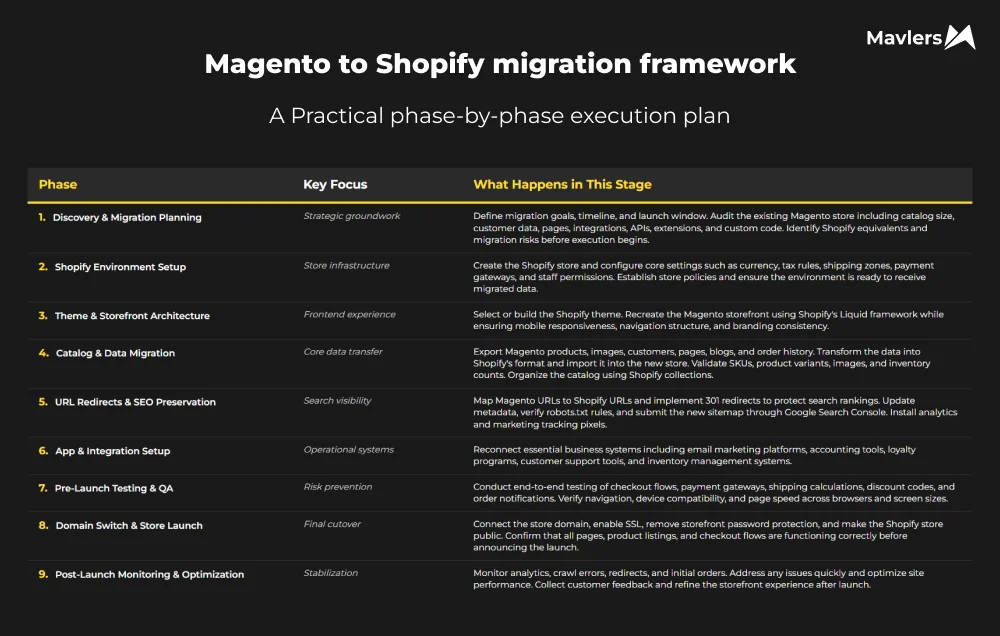
Magento to Shopify migration framework
The road ahead
Most Magento to Shopify migration projects still follow an outdated mindset: move the store quickly, deal with the fallout later. Teams brace for downtime, accept some data won’t make it, and treat temporary SEO drops as a package deal of the migration.
It’s time to drop that belief.
A Magento to Shopify migration deserves to be treated more deeply than just data uprooting. It’s a transformation with a lot of work around rebuilding foundations, restructuring product data, recreating storefront logic, and safeguarding SEO with well-planned redirects.
If a Magento to Shopify migration is in the pipeline and you want to nail the first time, let’s talk.
Book a no-obligation call with one of our Shopify experts to discuss your migration plan.